Geometry Prep with PyAnsys: What You Can Automate, and What Still Needs a Click
CAD never arrives mesh-ready. It shows up with cosmetic fillets the size of a mesh seed, edges shorter
than your element, bodies that interpenetrate, plates that should be shells and tubes that should be
beams. Cleaning that up by hand is the unglamorous tax on every FEA job. So we asked a practical question and answered
it honestly: how much of that prep can you script, headless, with PyAnsys Geometry (ansys-geometry-core
driving the Ansys Geometry Service)? We built three deliberately messy parts and ran the prep live — every number
below was written by the geometry service itself, nothing mocked. Here are the pros and the current scope, straight.
The pros — defeature, clean, and name, fully scripted
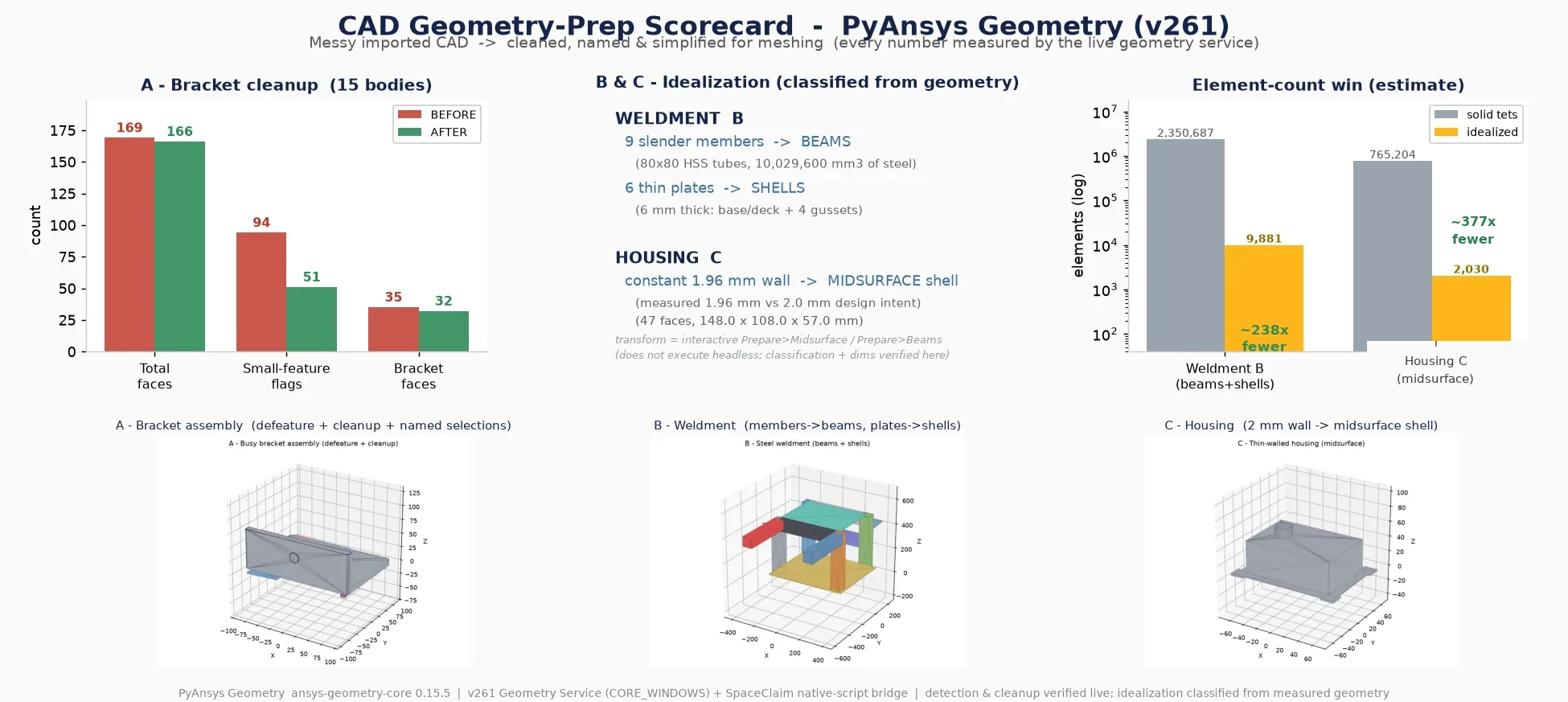
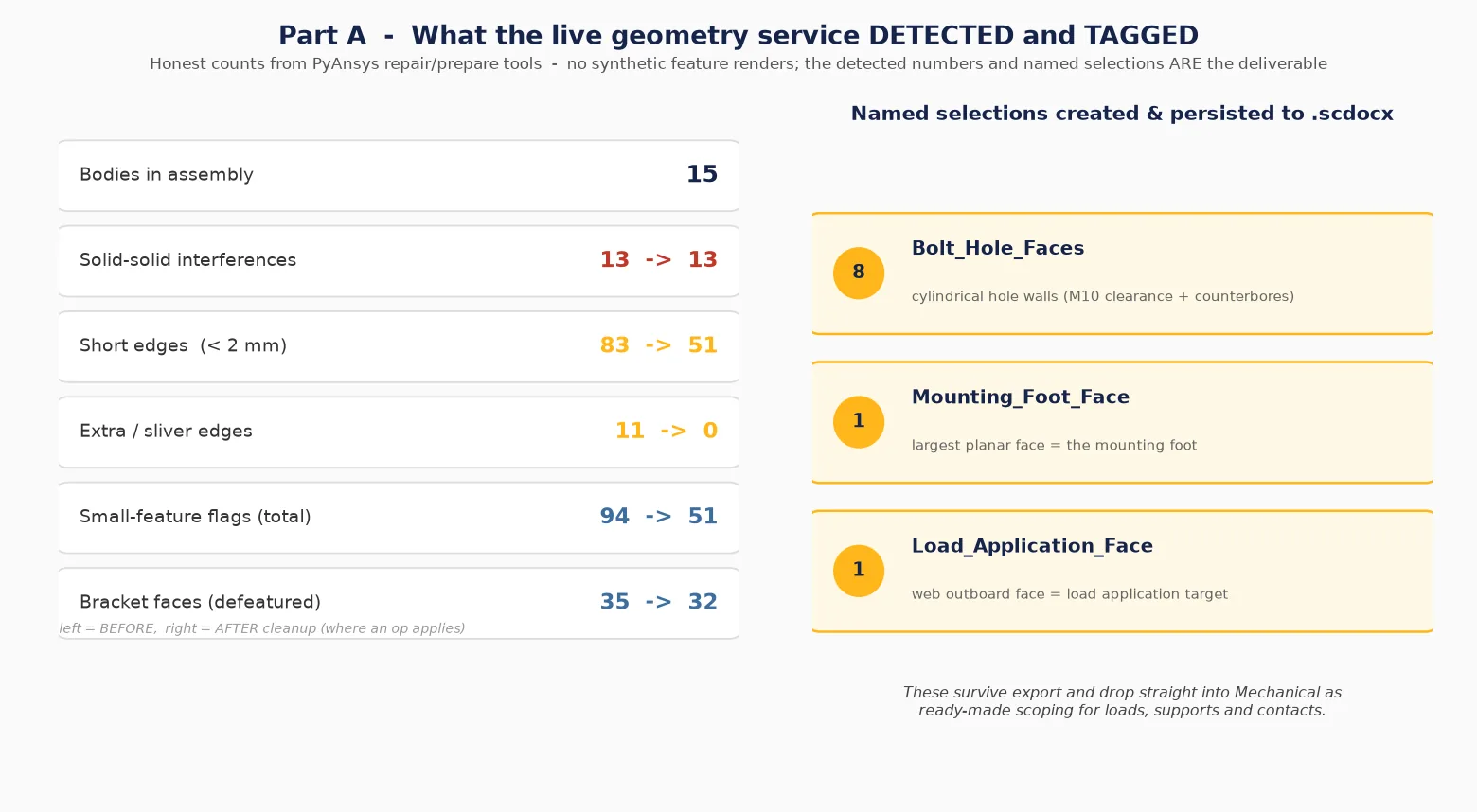
This is the strong half, and it’s genuinely strong. Our test part is a 15-body bolted bracket with the mess engineered in: three real solid-on-solid interferences, two sub-millimeter stitch gaps, a knife-edge sliver, an embossed logo, and a bracket carrying 35 faces’ worth of holes, counterbores, chamfers and 0.5 mm cosmetic fillets. PyAnsys Geometry handled the cleanup directly and reproducibly:
| Metric | Before | After |
|---|---|---|
| Small-feature flags (short + extra edges, small faces) | 94 | 51 |
| Short edges (< 2 mm) | 83 | 51 |
| Extra / sliver edges | 11 | 0 |
| Bracket faces (defeatured) | 35 | 32 |
| Solid-solid interferences detected | 13 | 13 |
| Named selections | 0 | 3 |
What ran, in order: detect small features and interferences → fix extra edges (11→0) and short edges (83→51) → remove small cosmetic rounds (35→32) → stitch → three named selections → export. The detection alone is worth the price of admission — it reliably flagged every short edge, sliver, and the 13 body-on-body interferences, which is exactly the triage you want before you ever open a mesher.
And the named selections are the quiet hero. They’re picked by geometry, not by face index:
cylindrical faces at the bolt-hole radius become Bolt_Hole_Faces, the largest planar face becomes the
Mounting_Foot_Face, the web’s outboard face becomes the Load_Application_Face. Because
they’re defined by geometric rule rather than a brittle index, they survive export and drop straight into
Mechanical as ready-made scoping for loads, supports and contacts — the part an analyst would otherwise re-click
on every single job. That is the genuine automation win here.
The boundaries — what still needs a click (for now)
We’d rather you hear this from us than discover it mid-project:
- Interference detection is solid; resolution is an interactive decision today. The service found all 13 overlaps
reliably, and the resolve calls (
cut_smaller_body, per-area.fix()) left these STEP-imported (OpenCASCADE) bodies unchanged (0 mm³ removed). So you get trustworthy detection — a real value — and the cut itself is still a manual decision. - A few repair calls are scoped to native (non-imported) geometry today.
On these STEP-imported (OpenCASCADE) bodies,
inspect_geometry,repair_geometryandfind_and_fix_simplifyreport “operation not supported for an OCC body”, so we scoped them out of the headless recipe; the stable path is the edge-fix + remove-rounds + stitch sequence shown above. - Export to
.scdocx, which works cleanly — headless STEP export from the service is scoped as a next step. - Idealization conversion is the step that stays interactive today (the big one — next section).
Idealization: the classification is automated, the conversion is the next click
A welded frame and a constant-wall housing, both modeled as solids — textbook idealization candidates. The good news: the classification is fully automated and verified from the real geometry. Sorting each body by its measured bounding box gives 9 slender HSS members → beams (80×80 tubes, 420–520 mm, aspect 5.3–6.5) and 6 thin plates → shells (all 6 mm); the housing wall measures 1.96 mm off the solid, within 2% of the 2.0 mm design intent. That’s the analyst’s decision input, handed to you automatically.
The honest catch: the solid→midsurface and solid→beam conversion itself is an interactive step today —
Midsurface.Convert() and Beam.Create() are built around the interactive selection context of the
SpaceClaim/Discovery UI (Prepare ▸ Midsurface, Prepare ▸ Beams), so a fully headless conversion is scoped as the
next step. We do not fake converted bodies:
the deliverable is the verified classification and the measured dimensions, with the transform flagged as the one
interactive step that follows.
Why it’s worth the trouble — the element-count win (estimate)
We deliberately did not run a Mechanical mesh study to prove this (a Fluent job was on the box, and a tet-vs-shell sweep would contend for cores and a license). Instead we estimate element counts from the measured dimensions with standard meshing rules of thumb, every assumption stated: the weldment goes from ~2.35M solid tets to ~9,900 beam+shell elements (~240×), the housing from ~765k tets to ~2,000 shells (~380×). The driver is real — resolving a 5–6 mm wall with solid tets needs two or three elements through the thickness across a half-meter frame, which explodes the count; a beam or shell carries that dimension analytically and needs one. Order-of-magnitude engineering estimates, labeled as such.
ansys-geometry-core 0.15.5 → Ansys Geometry Service v261 for the cleanup, the SpaceClaim
native-script bridge for the idealization analysis; the three messy “imported-CAD” parts were authored in
cadquery so we controlled exactly what mess to throw at it.How many analyst-hours does your team lose to imported CAD before the first mesh ever runs? PyAnsys
Geometry (ansys-geometry-core driving the live Ansys Geometry Service) scripting the whole cleanup
headless — small-feature flags 94→51, sliver edges 11→0, all 13 solid-solid interferences detected,
three geometry-picked named selections that drop straight into Mechanical — with the SpaceClaim native-script
bridge verifying the idealization call (9 beams, 6 shells, a 1.96 mm wall within 2% of design intent), every
number measured by the service itself and nothing mocked — is how simulation turns the unglamorous prep tax
into a reproducible script before your next project pays it by hand. That's innovation through insight.