Yes, It Runs DOOM — on the Ansys Mechanical Mesh
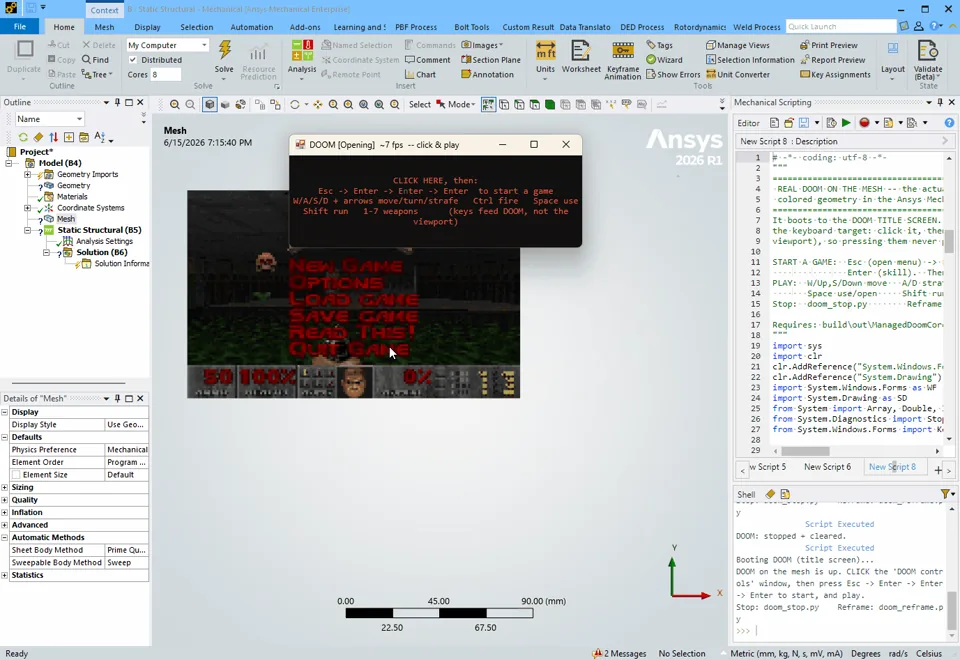
There is a running joke in engineering: but does it run DOOM? People have booted the 1993 shooter on calculators, oscilloscopes, pregnancy tests, and a John Deere tractor. So we asked the obvious question about the tool we live in all day — could we make Ansys Mechanical run DOOM? Not a video of DOOM. Not a lookalike. The real game engine, running inside Mechanical, with every frame painted onto finite-element shells in the 3D viewport. It works, it’s playable, and it is the most honest stress-test we know of for just how far the Mechanical scripting interface will bend.
The trick: a framebuffer is just a grid of colored quads
A finite-element mesh and a video frame have more in common than they look. A frame is a grid of pixels, each with a color; a shell mesh is a grid of elements, each of which can be drawn with a color. So the whole idea reduces to one mapping: take the game’s rendered image, shrink it to a manageable resolution, and draw one flat shell element per pixel, colored to match. Do that fast enough, on a loop, and the viewport becomes a screen.
We ran the picture at 160×100 — about 16,000 shell elements, redrawn every frame. That number is the dial that matters: lower it and the elements get big enough that you can see the mesh you’re playing on; raise it and the image smooths out but the redraw slows down. At 160×100 it sits right on the line where it’s clearly a game and clearly a mesh at the same time.
How it actually fits inside Mechanical
The engine itself is Managed Doom (sinshu’s GPLv2 C# port of id Software’s original
GPLv2 DOOM source), compiled once to a .NET assembly. Mechanical ships its own scripting runtime — IronPython on
.NET Framework 4.8 — so that assembly loads in-process, right alongside the model. From there the loop is
simple: each tick, advance the game one step, ask it for its rendered frame, bucket the pixels by color, and build the
shells through the same ACT graphics API a custom result-plotter would use — Scene.Factory3D.CreateShell,
one shell batch per color, set the color, redraw. Keyboard input goes through a small always-on-top control window so the
keys feed DOOM instead of panning the camera.
The point isn’t the game
No solver ran. No load case was set up. The engineering value of playing DOOM in a stress tool is, let’s be honest, zero. But the reach it demonstrates is the real story. The exact same scripting interface — the in-process .NET access, the ACT graphics API, the automation hooks — is what we use in production to do work that very much does have value: building FEA models from parameters, batching load cases, post-processing results into custom views and reports, and packaging repeatable studies as ACT apps. If the interface is open enough to host a 1993 first-person shooter, it is more than open enough to automate the repetitive simulation workflow that’s eating your team’s week.
That is the whole reason we keep one foot in the scripting layer of every Ansys tool we sell and support. When a customer’s real workflow is “set up the same kind of model forty times and extract the same six numbers,” the answer lives in exactly this part of the software. DOOM is just the most fun way we’ve found to prove the door is wide open.
Is your team’s week disappearing into setting up the same kind of model forty times and extracting the same six numbers? The exact scripting surface this stunt pushed to an absurd extreme — Ansys Mechanical’s in-process IronPython runtime and the supported ACT graphics API, open enough to redraw ~16,000 colored shell elements every frame with nothing in Ansys patched or modified (and honest that no FE solve ran) — is how simulation turns that repetitive workflow into parameterized models, batched load cases, and automated custom reports before it eats another engineering week. That’s innovation through insight.